
Software
Novice Money
An online account register with daily cash-flow projections, recurring payments, and practical tools for keeping your household finances organized.
- Platform
- Web browser (online)
Your balance today is only part of the picture. Novice Money brings recorded transactions and scheduled bills and income together so you can see what is coming next. Built for people who like a familiar checkbook-style register, it combines detailed records with a clear view of the days between paychecks, on a phone or a larger screen.
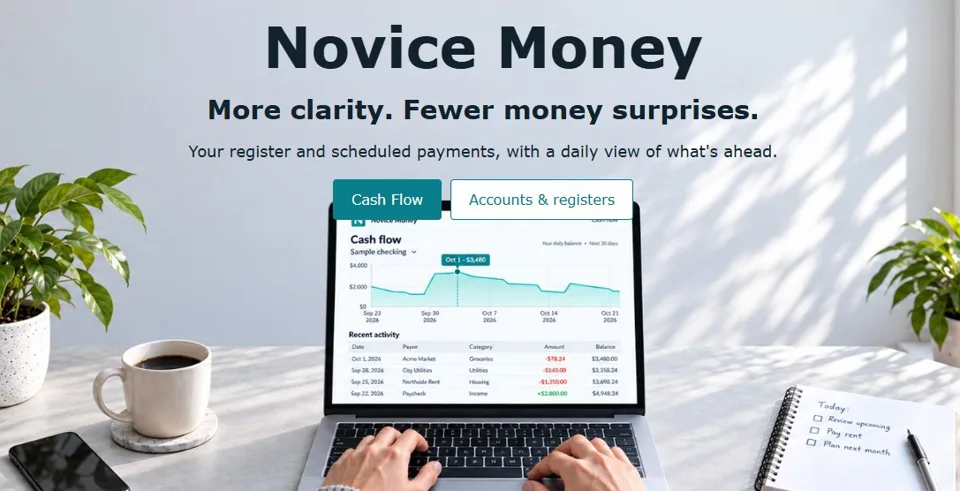
See your balance day by day
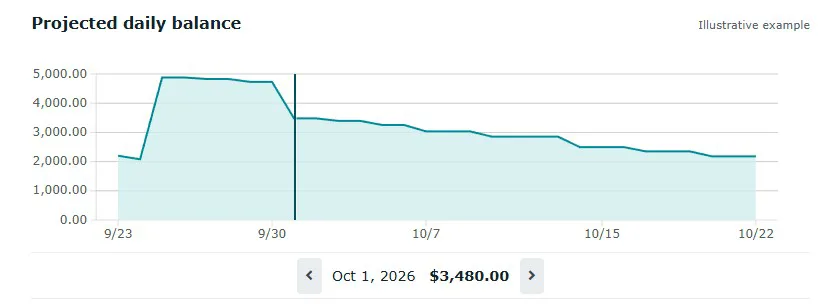
Cash Flow is the central view: one daily closing-balance line, with the transactions that explain it underneath. Recorded history, future-dated entries, and scheduled payments contribute to the picture, while linked payments already entered in the register are not counted twice.
- Choose an account and a future, historical, or custom date range.
- Look ahead from seven days to twelve months, with an adjustable lookback for recent activity.
- Inspect a date and its projected balance with the chart's vertical guide.
- Select a transaction to locate its date on the chart.
Keep a familiar, usable register
Track multiple accounts, deposits, withdrawals, and transfers between accounts. Running balances and distinct outstanding, cleared, and reconciled statuses make it easier to review your records against your bank.
- Search, sort, and filter individual columns to find the entries you need.
- Edit eligible dates, payees, categories, and amounts directly in the row; open the full editor for memo, check number, and other details.
- Create a new payee while entering a transaction and assign preferred categories to reduce repeated entry.
- Organize categories into parent and child groups, with recognizable icons and household-specific choices alongside the shared catalog.
- Reconcile a statement against its starting and ending balances, with protections for finalized records.
Plan bills and paychecks together
Schedule recurring expenses and income, including twice-monthly payroll on two days you choose. Enter an occurrence early when its actual date changes, or skip one cycle without shifting the rest of the series. Optional automatic posting puts eligible scheduled entries into the register through server maintenance, without requiring you to keep the page open.
Make bank imports easier to repeat
Bring in bank CSV files or supported QIF transaction exports. CSV column mapping lets you match your bank's headers to the fields Novice Money needs and save a profile for later imports. Review the proposed entries before committing them.
- Map several bank descriptions to one recognizable payee using exact, starts-with, or contains aliases.
- Give an alias a default category and manage mappings during import or on the dedicated alias page.
- Load a CSV just to refine its mappings without adding ledger entries.
- Review likely duplicates separately. Matching date, payee, and amount helps identify repeats in overlapping exports, while explicit choices let you retain legitimate repeated transactions.
- See mapping conflicts and other blockers before saving.
Understand the past and test the future
The connected Plan & Review views answer different questions. Cash Flow shows the daily account balance. Income & Spending breaks recorded activity down by day, month, category, or payee, with previous-period comparisons and supporting transactions. Forecast & What-if lets you compare a hypothetical expense or a changed scheduled payment with the baseline, including the lowest balance and first date below your threshold, without changing your saved records.
Share a household and choose your reminders
Invite someone by email to join a named household, with owner, editor, or viewer access. Existing users can accept with their account; new users can register and join. Switch between households you belong to, manage members, and leave a household when the ownership and membership safeguards permit it.
Choose email reminders for bills due today, upcoming or unresolved bills, expected income, low balances, weekly summaries, and monthly reviews. Set your time zone and a local delivery window, choose which accounts to include, limit financial detail in emails, or pause and opt out of reminders.
Keep control of your records
Household owners can save named financial backups before a major cleanup, review what each contains, and restore a selected snapshot with confirmation. Backup options include whether to retain supporting history. These are financial-data snapshots, separate from sign-in credentials and household access settings. Account access also supports verified email registration, password recovery, and optional authenticator-based two-factor authentication.
The goals behind Novice Money
Novice Money is built around four goals: make future balances understandable, keep everyday entry quick, make imported history easier to maintain, and let households coordinate without losing control of their records. A familiar, readable register should stay useful as your history grows, from checking a balance on your phone to reviewing years of activity on a larger screen.
Get started
- Open Novice Money in a current web browser, create an account, and confirm your email.
- Add an account and establish its opening balance, then enter transactions or review a CSV or QIF import.
- Add recurring bills and income, including the dates that matter for your pay cycle.
- Review Cash Flow, reconcile against your statements, and choose your household and reminder preferences.
Novice Money is an online, US-English, US-dollar-oriented application. It needs an internet connection; there is no desktop installation required. Imports and manual entries are not a live bank feed. Recording a payment or transfer does not move money, and projected balances depend on the records and schedules you maintain.